What it really takes to build an iPhone app with AI in 2026
AI can write the code for a simple iPhone app now. Everything around the code is still there: a Mac, Apple’s developer tools, an AI plan, some Swift, code signing, a paid Apple account and App Store review. Here is the whole list, with what each part costs.
Key takeaways
- Apple’s app-building software, Xcode, only runs on a Mac with an Apple chip. The Mac mini starts at $899 [1][6].
- AI coding agents cost $8 to $500 a month on individual plans, and they still expect you to run Xcode and read its errors [8][9].
- Publishing on the App Store needs the Apple Developer Program, $99 a year, in your own name [14].
- Tapwah removes the Mac, the tools and the code: you describe the app and try it on a live iPhone screen in your browser. The Apple Developer account for publishing stays yours.
“Just ask the AI” is good advice for writing code. It doesn’t cover the parts of iPhone app making that happen outside the code. We counted them up, from the computer you need to the day your app goes live, and checked every price against the seller’s own page.
1. A Mac, with an Apple chip
You need a Mac to build iPhone apps with Apple’s tools. Xcode, the program used to build and submit them, is only sold for macOS, and the current version needs macOS 26.6 or later on a Mac with an Apple M1 chip or newer [6][7]. Older Intel Macs can’t run it, and neither can Windows PCs.
Apple’s US prices as of October 25, 2026:
| Mac | Starts at |
|---|---|
| MacBook Neo | $699 [2] |
| Mac mini (needs your own screen, keyboard and mouse) | $899 [1] |
| MacBook Air | $1,299 [3] |
| iMac | $1,499 [4] |
| MacBook Pro | $1,999 [5] |
Before you buy, check the model against Xcode’s current requirements [7]. If you’d rather not buy one, you can rent a Mac in the cloud, which adds a monthly bill and a remote desktop to learn.
2. Xcode, Apple’s app-building program
Xcode is free. Version 27.1 came out on October 15, 2026, and it is a 3.1 GB download from the Mac App Store [6]. It includes the code editor, the build system and the iPhone simulator you use to try your app on the Mac.
Free doesn’t mean simple. Xcode is a professional tool with project settings, build targets, signing options and error panes. An AI agent can edit your code, but you are the one who opens the project, presses Run and reads what went wrong.
3. An AI coding agent subscription
The popular AI coding tools all have paid plans, and the heavier plans are aimed at people who code all day. Individual prices as of October 25, 2026:
| Tool | Individual plans (per month) |
|---|---|
| Claude, with Claude Code (Anthropic) | Pro $20 (or $17 billed yearly), Max from $100 [8] |
| ChatGPT, with Codex (OpenAI) | Go $8, Plus $20, Pro from $100 (tiers at $100, $200 and $500) [9] |
| GitHub Copilot | Pro $10, Pro+ $39, Max $100 [10] |
| Cursor | Plus $8, Premium $30, Super $100, Ultra $200 [11] |
These tools are good at writing Swift. They work inside a developer’s setup, though. They assume you have a Mac, have Xcode installed and can tell whether the change they made is the one you wanted.
4. Enough Swift and Xcode to steer the agent
Agents get things wrong, and an iPhone app either builds or it doesn’t. When a build fails, Xcode shows a compiler error, and someone has to decide whether to paste it back to the agent, undo the change or fix one line by hand. You don’t need to become a developer, but you do need to read Swift well enough to notice when the agent has gone in circles.
The same goes for project settings. The app’s icon, its name, its bundle identifier and the iOS versions it supports all live in Xcode’s project settings, which you’ll need to find your way around.
5. Simulators and test devices
The simulator in Xcode is free and good for most testing. To try your app on your own iPhone, you connect the phone to your Mac and let Xcode install it. A free Apple account allows up to 3 devices, and apps installed that way expire after 7 days [12]. After that, you rebuild and reinstall.
6. Code signing, certificates and provisioning profiles
Every iPhone app has to be signed, which proves who built it. Signing uses a certificate tied to your Apple account and a provisioning profile, a file that lists which app, which certificates and which devices go together. Creating one by hand needs an App ID, at least one development certificate and registered devices [13]. Xcode’s automatic signing handles most of this for you. When it can’t, you get a signing error to decode before the app will run.
7. The Apple Developer Program: $99 a year
To use TestFlight or publish on the App Store, you join the Apple Developer Program. It costs $99 a year [14]. Membership gives you App Store Connect, Apple’s website for submitting and managing apps, along with full access to certificates and profiles [12].
8. App Store Connect: screenshots, privacy details and review
Your app needs an App Store listing before Apple will review it. That includes:
- Screenshots: at least one and up to 10 per device size, including one for an iPhone with the Dynamic Island [15].
- Privacy details: the “nutrition label” that tells people what data your app collects. Apple requires it for new apps and for every update [16].
- A privacy policy and support link: Apple requires a link to each, and every link must work [17].
- App Review: Apple typically reviews at least half of submissions in under 24 hours and 90% in under 48 hours. Over 40% of the unresolved issues it sees fall under guideline 2.1, App Completeness, which covers crashes, placeholder content and missing information [17].
If Apple rejects a submission, you read its note, change the app or the listing and submit again.
9. TestFlight, for testing with friends
TestFlight lets other people install your app before it’s public. You can invite up to 100 internal testers from your team and up to 10,000 external testers by email or link. The first build you share with external testers goes through App Review [18], and each build can be tested for up to 90 days [19].
What it adds up to
Before any code is written, the usual route costs at least $899 for a Mac mini (plus a screen if you don’t have one) and $99 a year to publish. Add an AI plan at $8 to $500 a month, and the hours it takes to learn Xcode, Swift, signing and App Store Connect. None of these steps is impossible, but each one is something to learn before you see your idea running on a phone.
Or use Tapwah
Tapwah runs the Mac side for you. You open it in a browser on any computer, Windows included, and describe your app in a chat. Tapwah’s agent writes a native iPhone app in SwiftUI, builds it, fixes its own build errors and runs it on a live iPhone screen next to the chat. You tap through it with your mouse and ask for changes in plain words.
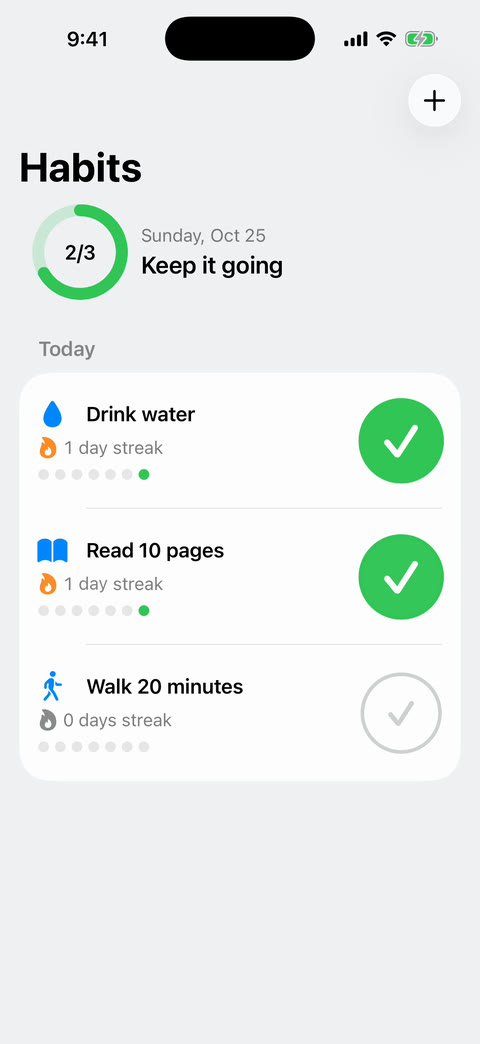
We tried it on October 25, 2026 with four small starter apps, built back to back in one session: a habit tracker, a running club schedule, a recipe box and a bill splitter. Each went from one message to a running app in between 21 seconds and about a minute, and used between $0.09 and $0.19 of AI work. A first build can take about a minute. You can see all four, with their prompts, on our showcase.
Here’s what Tapwah takes off the list:
- the Mac, because ours do the building;
- installing and learning Xcode;
- a separate AI subscription, since AI work is part of your daily allowance (free plan: $3 a day and 60 minutes of building);
- reading Swift and build errors;
- signing and certificates for trying your app, which happens on our side.
What Tapwah doesn’t remove
To publish on the App Store, you still need your own Apple Developer Program membership at $99 a year [14]. Apple shows the developer account’s name as the seller of every app it publishes [20]. If we published your app from our account, it would be ours on paper. With your own, it’s yours.
You only need that account at the end. Building and trying your app in Tapwah needs no Apple account at all. Guided App Store publishing is coming soon in Tapwah: we’ll walk you through the developer account, the listing, screenshots, privacy details and review.
Tapwah has limits of its own today, and we’d rather you hear them from us. Apps can’t use the internet yet, things that need phone hardware such as the camera can’t be tried on the live screen, and each account works on one app at a time. How it works has the full list.
Questions people ask
Can I build an iPhone app on Windows?
Not with Apple’s own tools, because Xcode runs only on macOS. You can rent a Mac in the cloud, or use a service such as Tapwah that runs the Mac side for you and shows the app on a live iPhone screen in your browser.
Do I have to pay Apple to build an iPhone app?
No. Xcode is free, and a free Apple account lets you test on up to 3 of your own devices, with apps that expire after 7 days. You pay the $99 a year Apple Developer Program fee when you want TestFlight or the App Store.
How long does App Store review take?
Apple says it typically reviews at least half of submissions in under 24 hours and 90% in under 48 hours. Over 40% of the issues that hold apps back are about completeness, such as crashes or placeholder content, so finish the app before you submit.
Can AI build a whole iPhone app by itself?
For small apps, AI can now write all of the code. In our own test, four starter apps each went from one message to a running app in about a minute or less. The Mac, the developer account, signing and App Store review still need a person.
Sources
- Apple Store: Buy Mac mini (US). Mac mini from $899. Retrieved October 25, 2026.
- Apple Store: Buy MacBook Neo (US). MacBook Neo from $699. Retrieved October 25, 2026.
- Apple Store: Buy MacBook Air (US). MacBook Air from $1,299. Retrieved October 25, 2026.
- Apple Store: Buy iMac (US). iMac from $1,499. Retrieved October 25, 2026.
- Apple Store: Buy MacBook Pro (US). MacBook Pro from $1,999. Retrieved October 25, 2026.
- Xcode on the Mac App Store. Free; version 27.1 (October 15, 2026); 3.1 GB; requires macOS 26.6 or later and a Mac with an Apple M1 chip or later. Retrieved October 25, 2026.
- Apple Developer: Xcode system requirements. Xcode 27 needs macOS Tahoe 26.6 or later. Retrieved October 25, 2026.
- Claude pricing (Anthropic). Pro $20 a month billed monthly ($17 a month billed yearly); Max from $100 a month; Claude Code included in Pro and Max. Retrieved October 25, 2026.
- ChatGPT and Codex pricing (OpenAI). Codex included in Free, Go ($8), Plus ($20) and Pro (from $100, with $100, $200 and $500 tiers). Retrieved October 25, 2026.
- GitHub Copilot plans. Pro $10 a month, Pro+ $39 a month, Max $100 a month. Retrieved October 25, 2026.
- Cursor pricing. Plus $8, Premium $30, Super $100 and Ultra $200 a month. Retrieved October 25, 2026.
- Apple Developer: Developer account overview. Free accounts: up to 3 devices and 10 App IDs, which expire after 7 days; members get App Store Connect and full certificate and profile access. Retrieved October 25, 2026.
- Apple Developer: Create a development provisioning profile. A profile needs an App ID, one or more development certificates and registered devices; Xcode can manage App IDs and devices for you. Retrieved October 25, 2026.
- Apple Developer Program. $99 annual membership. Retrieved October 25, 2026.
- App Store Connect: Screenshot specifications. 1 to 10 screenshots per device size; at least one for iPhone with Dynamic Island. Retrieved October 25, 2026.
- App Store: App privacy details. Required to submit new apps and app updates. Retrieved October 25, 2026.
- Apple Developer: App Review. 50% of submissions reviewed in under 24 hours, 90% in under 48; over 40% of unresolved issues relate to guideline 2.1, App Completeness. Retrieved October 25, 2026.
- Apple Developer: TestFlight. Up to 100 internal and 10,000 external testers; external testing needs App Review approval of the first build. Retrieved October 25, 2026.
- App Store Connect Help: TestFlight overview. Builds can be tested for up to 90 days. Retrieved October 25, 2026.
- Apple Developer Program: What you need to enroll. For individuals and organizations, the enrolled name is displayed as the seller name of their apps on the App Store. Retrieved October 25, 2026.
Prices are US list prices and change often. If you spot one that’s out of date, tell us at hello@tapwah.com and we’ll update this page.